
Q&A: Is sending with GMAIL bad? What about using video in emails?
You send questions, I answer them for all the world to see. A rising tide lifts all boats, so make sure you steal, er…. adapt these answers and ideas to your own email marketing sends!
Q. I was going to start an email newsletter, but someone told me it’ll probably just end up people’s SPAM folders. Is this true?
A. If you’re just sending to a big BCC list using something like Gmail account – probably, yes. Don’t do that.
“There are a lot of spammers using @gmail.com to send out mass emails. So to protect their sender’s reputation, Google has strong anti-spam policies that often block bulk emails, whether it is spam or not,” says Email Octopus.
Use a for-real “Email Service Provider” like MailChimp or Substack. They’re built for sending to lots of people (unlike Gmail), and have better tools to get people to subscribe to your list, too, with landing pages (a fancy term for “a website where people can sign themselves up for your email list).
If you send with something legit, your email probably won’t go to spam. That said, you can still fuck things up! Check out Mailchimp’s ‘How to Avoid Spam Filters,’ and “only email people who have given you permission!”
Q. I’m thinking of starting an email list to let people know about my upcoming shows. I’m thinking about starting a YouTube account to post video, too. Google says Constant Contact is the best platform for embedded video in email. Do you think this is true? (from SH)
A. The way I’ve been “embedding” videos is screen shots of the YouTube player, and putting that into Mailchimp (or Klaviyo, or Substack), like this:
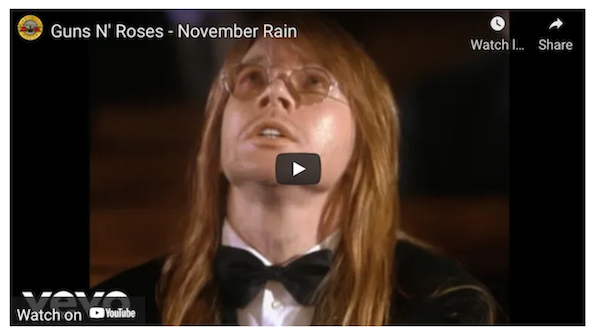
Adding a button helps, too. People love buttons.
“Using a call-to-action button instead of just a text link got us a 28% increase in click-throughs,” says Campaign Monitor in a test they did.
“Lastly, don’t assume the reader only clicks on the CTA button. Curious people often try to click different elements in the email like the logo, headlines, and images. Consider adding the same link to those elements if you think it will help the reader,” says MailerLite.
This is why I always link video screen shots to the video, too!
You could also use an animated GIF for your video, too. Just be mindful of the file size. “Ensure you GIF is sized at 0.5 MB or 1 MB maximum,” says Send In Blue. Check out ‘A guide to animated GIFs in email’ from Litmus for lots of insight.

Video is tricky in emails, so I’m a big believer in using the most “basic” method, to makes sure it works for everyone.
💬 Questions or thoughts? Send me an email.
One-to-one help via email. Let’s figure out your website, your newsletter, your online store without a Zoom call, new logins, or calendar links. Learn more here.
In this 90-minute hands-on session (and cohort?!), we'll be building a real web page together. You'll write some HTML (by hand!), add some style, and publish it to the internet before we say goodbye. Register here.
READ MORE POSTS ABOUT:

I help creative people quit social media, promote their work in sustainable ways, and rethink how a website and newsletter can work together. Find out more here. 🏳️🌈🏳️⚧️
Join us — start a 30 membership and hop on our next Zoom call meeting!
Trying to figure out your email strategy, grow without social media, maybe not sure what to send to people? I’ve got Email Guidance spots open, and here’s how it works and how to book.
Prefer a focused conversation instead? Book a 1:1 call and we’ll dig into your work together.
Email me: seth@socialmediaescape.club
Subscribe via RSS